01 — Overview
A routine internal process was creating unnecessary work for staff and managers.
Challenger managed internal gift redemptions with handwritten paper forms. Over time, the process created missing records, delayed submissions and a growing administrative burden.
The opportunity was to replace that manual workflow with a digital experience that was efficient, secure and centralised while remaining simple enough for any staff member to use with minimal instruction.
My role
As lead UX designer, I handled staff research, wireframing, prototyping, usability testing and the final implementation of the redesigned digital workflow.
02 — The challenge
Paper forms made a simple redemption process difficult to track, verify and maintain.
Staff had to complete and manage handwritten forms, while managers lacked a clear view of approvals, records and redemption activity.
Problem statement
How might we replace paper-based gift redemptions with a simple digital workflow that improves accuracy, visibility and administrative efficiency?
Misplaced records
Paper forms could be lost, delayed or difficult to retrieve when needed.
Manual workload
Repeated data entry and record management created unnecessary administrative work.
Limited visibility
Managers had little transparency into approvals, audit history and redemption activity.
03 — Research
Staff interviews revealed where the existing process was breaking down.
We interviewed staff at Challenger's flagship store to understand the practical frustrations of managing redemptions through paper forms.
Paper forms were stacking up, making them difficult to store and retrieve while making the process feel outdated.
What the research revealed
- 1
Forms were often misplaced or delayed. Physical records were cumbersome to store, retrieve and follow through the process.
- 2
Redemptions were difficult to audit. Managers lacked a centralised view of submissions, approvals and past activity.
- 3
Form completion was unnecessarily tedious. Manual inputs increased the chance of inconsistent information and avoidable errors.
04 — From insight to solution
The redesigned workflow replaced repetitive manual steps with structured automation.
We created a Google Form integrated with Google Apps Script, using conditional logic, centralised records and automated confirmations to simplify the entire redemption process.
Research insight
Paper redemption forms were misplaced, delayed and difficult to retrieve.
Design decision
Replace handwritten forms with a tablet-friendly digital form connected to a central record.
What changed
Each submission was captured immediately and synced to a shared, searchable system.
Research insight
Manual input created inconsistent information and increased the administrative workload.
Design decision
Use dropdown menus and conditional fields to collect only the information relevant to each redemption.
What changed
Staff made fewer input errors and completed the process with less guidance.
Research insight
Managers lacked visibility into approvals, redemption activity and audit history.
Design decision
Automate approval records, confirmation emails and backend storage with Google Apps Script.
What changed
Managers gained clearer oversight while repetitive follow-up and record keeping were reduced.
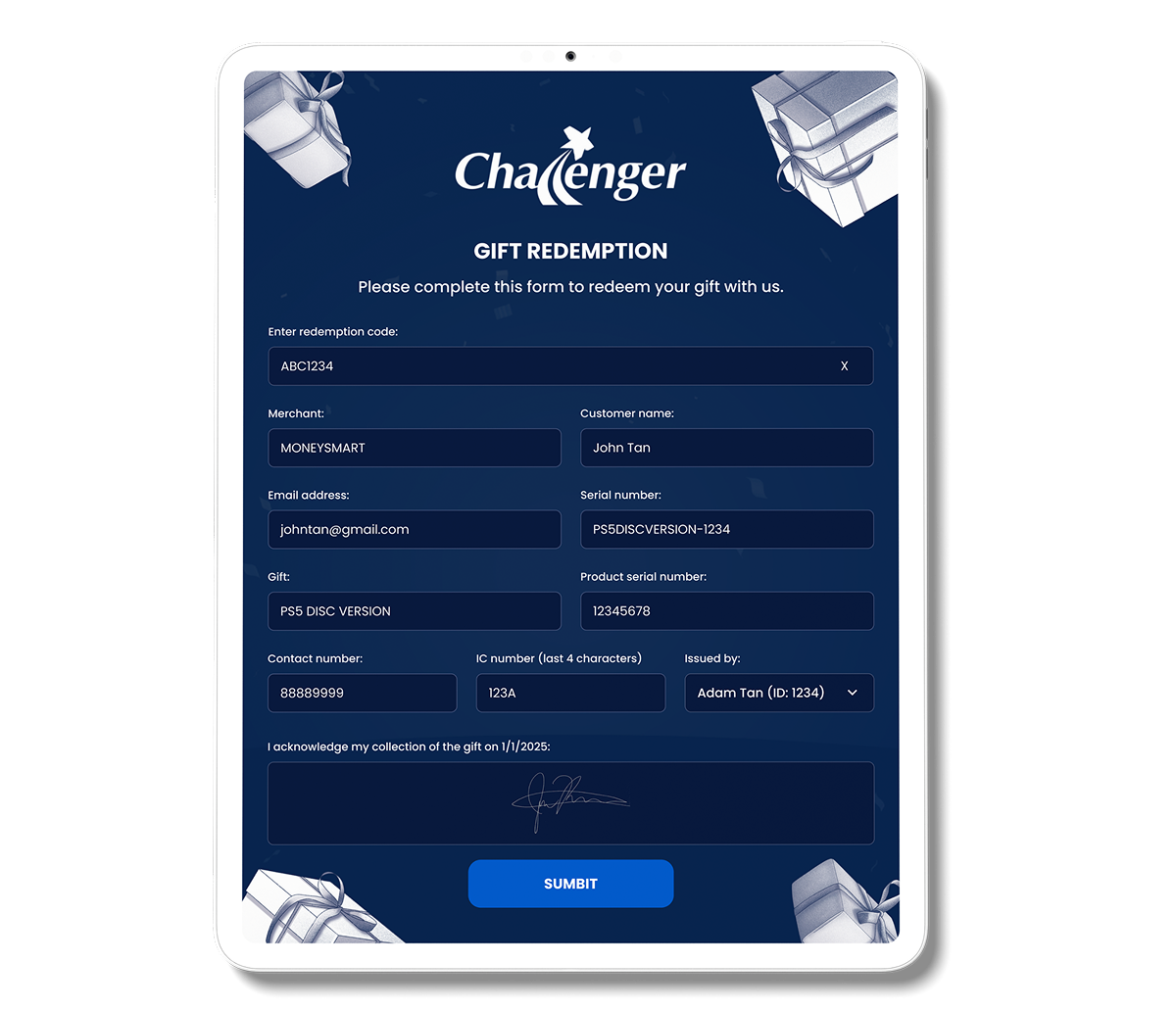
Key features introduced
Tablet-friendly form
Staff could complete redemptions digitally without relying on paper forms.
Conditional fields
Relevant questions appeared based on the details of each redemption.
Structured inputs
Dropdown menus improved consistency and reduced avoidable input errors.
Approval workflow
Staff and manager approvals were included in the redesigned process.
Automated records
Submissions synced with Google Sheets and were stored centrally.
Email confirmations
Google Apps Script automatically triggered confirmation emails.
05 — Validation
Usability testing confirmed the workflow was easier, while revealing where guidance was still needed.
Challenger staff tested the prototype across the core redemption journey. Dropdown menus helped reduce input errors, while some users needed additional guidance around conditional fields.
Based on that feedback, we streamlined the instructions and added tooltips to make the experience clearer without adding unnecessary complexity.
Complete a digital redemption form
Easier to useSelect the correct redemption details
Fewer input errorsUnderstand conditional questions
Clearer guidanceCapture approvals and confirmations
Automated records06 — Impact
A simpler internal workflow produced a substantial operational improvement.
Digitising gift redemptions reduced administrative effort, eliminated missing entries through automated syncing, improved data quality and helped staff adopt the process with minimal training.
80% less time
Administrative processing time compared with paper forms.
Zero missing entries
Automated backend syncing created a complete central record.
Faster onboarding
Staff needed minimal training to complete the new workflow.